WINDOWS 7 VS 10
1.Ironically, Windows 7 users who upgrade to Windows 10 are in for less of a big shock than they think. You may have heard of Windows 8’s Start Screen. In Windows 8 everyone was forced to interact with the Start Screen, which completely takes over your entire display. Windows 10 users can expect a Start Screen that matches what’s available in Windows 7. It may look different but the idea is the same. To the right of recently used files and folders is an area reserved for the Live Tiles of apps download from the Windows Store.
 Once upon a time, Gadgets were the way Microsoft hoped you’d get basic info. Windows 7 didn’t introduce them, they were actually available in Windows Vista. You simply downloaded your favorite Gadgets for the latest news or weather. In Windows 7 they float on the right side of your screen.
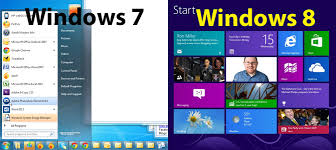
1.Ironically, Windows 7 users who upgrade to Windows 10 are in for less of a big shock than they think. You may have heard of Windows 8’s Start Screen. In Windows 8 everyone was forced to interact with the Start Screen, which completely takes over your entire display. Windows 10 users can expect a Start Screen that matches what’s available in Windows 7. It may look different but the idea is the same. To the right of recently used files and folders is an area reserved for the Live Tiles of apps download from the Windows Store.
2.In Windows 10, Gadgets are dead. Technically, they died in Windows 8 when Microsoft introduced Live Tiles. Think of Live Tiles as everything you might have loved or hated about Gadgets. They show your latest emails, who just sent you a friend request on Facebook and more. You can resize them and stick them directly on your Start Menu. The trick here is that Live Tiles double as shortcuts for apps. You click on them to look at whatever is surfacing on a Live Tiles.
3.The media landscape is a perfect presentation of just how much personal computing has changed since Windows 7 was released. With Windows 7 you might still find yourself watching television in your living room using Windows Media Center, organizing your music collection with Windows Media Player and watching DVDs effortlessly.
4.Throw out everything you know about media for Windows 10 because there are a lot of changes. First, chances are that you watched DVDs in Windows Media Player or one of the other apps device makers included on their PCs. Make sure you do an upgrade to Windows 10 instead of a fresh install or you’ll lose the ability to play DVDs without purchasing another app. Not only has Windows Media Player been relegated to legacy status, Microsoft went and removed built-in DVD playback. To be clear, you can still purchase a DVD player app if they’re really important to you.
5.Windows Media Center is no longer part of Windows. In Windows 8 it was a separate download for users who purchased Windows 8 Professional or purchased a device with it loaded already. If your Windows 7 PC has a TV tuner that you depend on, wait until Microsoft announces its Windows 10 plans for Windows Media Center. It’s entirely possible that it won’t be available at all.
6.Windows Media Player and Windows Media Center were shown the door because almost everyone streams their television shows, music and movies. Xbox Music and Xbox Video support the latest entertainment options. Xbox Music will playback MP3s and other audio files you own. You can also sign up for Microsoft’s Xbox Music subscription service. Xbox Video supports all the video files you’ve probably been downloading the VLC Media Player desktop app to watch. In addition, you can purchase more television shows and movies inside the app. There’s also support for video rentals. Windows Media Player is still around, Microsoft just isn’t improving on the application.
Instead of plugging a cable into your phone or tablet to sync your media, Windows 10’s apps handle this automatically.
7.Windows 10 has the Alt+Tab shortcut, but it’s been fine-tuned a bit. Now, all the apps that are open lay flat across your screen, giving you a better idea of what’s going on in them. Windows 10 also includes multiple Desktops. With the feature, you can partition your personal life from your home life and keep all of your personal apps in one screen meanwhile your work apps are sitting in another
8.Where the Windows 7 Taskbar was clear and barren, the Windows 10 Taskbar has all sorts of extras. For starters, the taskbar is where Cortana, that aforementioned personal assistant lives. There’s a search bar specifically for her.On the far right of the Windows 10 Taskbar is the Action Center. Here you can choose different settings to quickly access. It’s also the one place all apps will surface notifications for you to check out.
There are various other reasons why one should upgrade to windows 10 or not.it depends on the purpose for which we use laptop,computer.

No comments:
Post a Comment